
iAutoText Keyboard SE1.0 - App Store
You'll be able to see results in few seconds.
Publisher Description
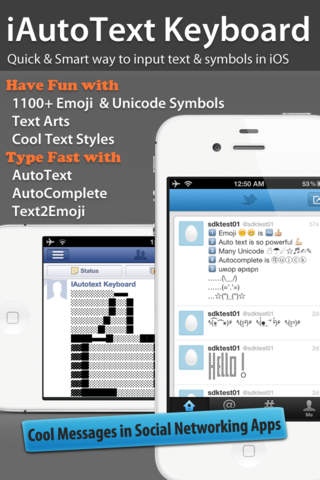
Type 180 words per minute and have fun with lot of Cute Icons, Text Arts and even Cool Text Styles in your message.
No more boring status update in Facebook & Twitter! Give your friends surprise on your super fast speed on replying their sms,email,WhatsApp,tweet, etc.
oo s x o u
( ) ( -) (- _ -)
( `* . B E A U T I F U L . * )
(\__/)
(= . =)
( )_( )
: . l . Volume . l .
:
: Min- - Max
( `* . iAutoText, smart way to input text & symbols . * )
iAutoText Keyboard is designed to cater all your needs when composing text messages. It offers a centralized place to compose, store, search, reuse and manage text messages.
Existing features include:
Enable 460+ emoji icons for iOS .
Single customizable library of Text Clips, Text Arts, Symbols.
1000+ icons and pre-defined shortcuts.
AutoComplete from your frequently typed words.
AutoText using your assigned shortcut and expanded into long text snippet.
Text2emoji to input emoji/unicode icons by shortcut key
Unicode symbols and keyboard
Cool TextStyles and lot of Text Art for your cool status update
Type and walk, typing in a transparent viewport and help you avoid obstacles when walking.
Send composed text to sms, email, twitter, facebook, tumblr directly.
Too much features! But we still put all of them in a single App because we think all are important for composing text message.
Watch the Demo video in http://tinyurl.com/iautotext
Major Features:
AutoText
Type faster using abbreviation shortcut which converted into long text snippet. You can create a library of abbreviation shortcuts for text clips that you use frequently, such as addresses, standard replies, chat shorthands, text arts and symbols.
Type the shortcut and Tap AutoText, it will automatically expands to the full text clip or the symbols.
AutoComplete
The App will autolearn what you have typed. Next time, it will suggest your commonly used words while you type.
Text2Emoji
Frequently used icons can be input directly with Text2Emoji.
e.g. Type :) and it will automatically convert to a smiley icon.
Cool TextStyles
10 Cool TextStyles for you to use in social networking.
oo s x o u
iautotext is cool
s c l
i a u t o t e x t i s C o o l
i a u t o t e x t i s C o o l
įąųţ ţę ţ įş
ťőť xť ś Čőől
Great Emoji, Unicode Symbols and Text Arts
(c)
Requires iOS 3.2 or later. Compatible with iPhone, iPad, and iPod touch.
About iAutoText Keyboard SE
The company that develops iAutoText Keyboard SE is iphonebestsoft .com. The latest version released by its developer is 1.0.
To install iAutoText Keyboard SE on your iOS device, just click the green Continue To App button above to start the installation process. The app is listed on our website since 2012-01-18 and was downloaded 0 times. We have already checked if the download link is safe, however for your own protection we recommend that you scan the downloaded app with your antivirus. Your antivirus may detect the iAutoText Keyboard SE as malware if the download link is broken.
How to install iAutoText Keyboard SE on your iOS device:
- Click on the Continue To App button on our website. This will redirect you to the App Store.
- Once the iAutoText Keyboard SE is shown in the iTunes listing of your iOS device, you can start its download and installation. Tap on the GET button to the right of the app to start downloading it.
- If you are not logged-in the iOS appstore app, you'll be prompted for your your Apple ID and/or password.
- After iAutoText Keyboard SE is downloaded, you'll see an INSTALL button to the right. Tap on it to start the actual installation of the iOS app.
- Once installation is finished you can tap on the OPEN button to start it. Its icon will also be added to your device home screen.
Program Details
System requirements
Download information
Pricing
Version History
version 1.0
posted on 2012-01-18
Disclaimer
Official App Store Link
We do not host iAutoText Keyboard SE on our servers. We did not scan it for viruses, adware, spyware or other type of malware. This app is hosted by Apple and passed their terms and conditions to be listed there. We recommend caution when installing it.
The App Store link for iAutoText Keyboard SE is provided to you by apps112.com without any warranties, representations or guarantees of any kind, so access it at your own risk.
If you have questions regarding this particular app contact the publisher directly. For questions about the functionalities of apps112.com contact us.
